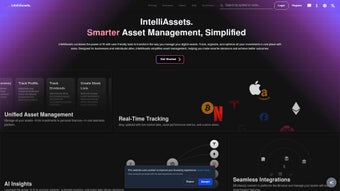

Download intelliAssets – AI‑Powered Digital Asset Management Tool
Overview
intelliAssets is an AI‑driven digital asset management (DAM) solution designed to bring order, speed, and intelligence to any organization that deals with large volumes of visual and document‑based content. Whether you run a bustling marketing agency, a media production house, or an e‑commerce platform with thousands of product images, intelliAssets provides a single, secure hub where every file can be stored, searched, and repurposed with minimal effort. The platform’s core strength lies in its ability to automatically analyze metadata, usage patterns, and visual cues to generate accurate tags, categories, and quality‑optimised versions of each asset. By doing so, it eliminates the manual labor traditionally associated with cataloguing and version control, freeing creative teams to focus on strategy rather than file‑management chores.
The software integrates seamlessly with existing DAM and content management systems (CMS) such as Adobe Experience Manager, Sitecore, and WordPress, acting as an intelligent layer that enriches rather than replaces your current workflow. Its AI engine continuously learns from user interactions, improving tagging accuracy and suggesting the most relevant assets for upcoming campaigns. Security is baked into the platform, offering role‑based permissions, encryption at rest, and audit logs that satisfy compliance standards across industries.
Beyond basic storage, intelliAssets offers lifecycle oversight—tracking assets from creation through publication, revision, and eventual archival. Automated alerts notify stakeholders when an asset is nearing expiration or when a newer version becomes available, ensuring brand consistency and reducing the risk of outdated media appearing in public‑facing channels. In short, intelliAssets is more than a repository; it is a productivity‑enhancing engine that transforms chaotic digital libraries into searchable, actionable assets. Companies that adopt the tool report faster time‑to‑market for campaigns, fewer duplicate files, and a measurable uplift in creative reuse, all of which translate into tangible ROI.
Key Features & Benefits
- AI‑Powered Auto‑Tagging: Machine‑learning models scan images, videos, and documents to generate descriptive tags and categories without manual input.
- Smart Search & Filters: Natural‑language queries and faceted filters let users locate assets in seconds, even across massive libraries.
- Seamless Integrations: Native connectors for popular DAM platforms (Adobe, Bynder) and CMSs (WordPress, Drupal, Sitecore) ensure a frictionless workflow.
- Version Control & Lifecycle Management: Automatic tracking of revisions, expiration dates, and archival rules keep content up‑to‑date.
- Bulk Optimisation: AI compresses images and transcodes videos on the fly, balancing quality with web‑ready file sizes.
- Role‑Based Access & Security: Granular permissions, encryption at rest, and detailed audit trails protect sensitive media.
- Collaboration Hub: Comments, approvals, and usage analytics foster teamwork and provide insight into asset performance.
- Customisable Metadata Schemas: Tailor fields to match industry‑specific requirements, from product SKUs to campaign IDs.
- Scalable Cloud Architecture: Elastic storage scales with your growing asset library while maintaining fast retrieval times.
- API‑First Design: Robust RESTful APIs enable developers to embed intelliAssets functionality into internal tools or external portals.
Each of these features contributes to measurable business outcomes. Marketing teams report up to a 40 % reduction in time spent searching for the right creative, while IT departments appreciate the reduced overhead of managing multiple storage solutions. By automating repetitive tagging tasks, intelliAssets also cuts operational costs and minimises human error, which is especially critical for compliance‑heavy sectors such as finance or healthcare. The platform’s analytics dashboard surfaces usage trends, helping leaders allocate resources to the most impactful assets and retire those that no longer add value. Moreover, the AI engine continuously refines its models, meaning tagging accuracy improves month over month without additional manual training, ensuring the system scales alongside your organization’s evolving needs.
Installation, Usage & Compatibility
Getting started with intelliAssets is straightforward, whether you choose the cloud‑hosted SaaS model or the on‑premises deployment for highly regulated environments. Follow these steps to install and configure the solution:
- Sign Up & License Activation: Visit the official intelliAssets website, create an account, and enter the license key provided in your purchase email. The system validates the key in real time and provisions your tenant.
- Choose Deployment Type: For SaaS, the platform is instantly available. For on‑premises, download the installer package (available for Windows Server 2019+, Ubuntu 20.04 LTS, and Red Hat Enterprise 8) and follow the guided wizard.
- Database Configuration: Connect to a supported database—Microsoft SQL Server, PostgreSQL, or MySQL. The installer creates the necessary schema and runs initial migrations.
- Integrate Existing Systems: Use the built‑in connectors to link your current DAM or CMS. Authentication can be handled via SAML, OAuth 2.0, or LDAP, ensuring single‑sign‑on across the organisation.
- Upload Assets: Drag‑and‑drop files into the web UI or use the bulk import API. The AI engine begins analysing each asset immediately, assigning tags and generating previews.
- Configure User Roles: Define groups such as “Creative,” “Legal,” or “External Agency” and assign permissions (view, edit, publish, delete) to each.
- Set Lifecycle Rules: Create policies that automatically archive assets after a defined period or trigger notifications when a version becomes outdated.
- Train the AI (Optional): Upload a small curated dataset of correctly tagged assets to fine‑tune the model for industry‑specific terminology.
intelliAssets supports Windows 10/11, macOS 12+, major Linux distributions, as well as mobile platforms (iOS 14+ and Android 9+) via a companion app for on‑the‑go asset review. The web portal is built on responsive design, so users can manage assets from any modern browser (Chrome, Edge, Firefox, Safari) without additional plugins.
Once installed, the intuitive dashboard guides users through common tasks: searching the library, editing metadata, initiating version reviews, and exporting assets for external use. Regular updates are delivered automatically for the SaaS version, while on‑premises customers receive quarterly patch releases that can be applied with a single click. Documentation, video tutorials, and a 24/7 support portal are available to ensure a smooth onboarding experience. In practice, teams typically complete their first full migration within two weeks, after which daily operations become faster, more transparent, and easier to audit.
Pros, Cons, FAQ & Final Thoughts
Pros
- Highly accurate AI auto‑tagging reduces manual effort.
- Seamless integration with leading DAM and CMS platforms.
- Robust security features meet enterprise compliance standards.
- Scalable architecture suitable for small agencies to global enterprises.
- Comprehensive analytics provide actionable insights.
- Responsive web UI works on desktop and mobile browsers.
- Extensive API library enables custom workflow automation.
Cons
- Initial AI training may require a modest amount of curated data.
- On‑premises deployment demands a dedicated IT resource for setup.
- Advanced features (e.g., custom metadata schemas) are only available in higher‑tier plans.
- Pricing may be a barrier for very small teams without a free tier.
Frequently Asked Questions
Can intelliAssets work with existing on‑premises DAM solutions?
Yes. intelliAssets provides connector modules for popular on‑premises DAMs such as Adobe Experience Manager, Bynder, and Canto. The integration syncs metadata in real time, allowing you to keep a single source of truth while benefiting from AI‑enhanced tagging.
Is there a free trial or a freemium version?
A 30‑day free trial is available for all subscription tiers. The trial includes full access to AI auto‑tagging, integrations, and analytics, so you can evaluate the platform in a production environment before committing.
How does intelliAssets handle large video files?
Large video assets are stored in a dedicated media bucket that supports chunked uploads. The AI engine extracts key frames, generates transcripts via speech‑to‑text, and creates low‑resolution previews for quick browsing without downloading the full file.
What compliance standards does intelliAssets meet?
The platform complies with GDPR, CCPA, ISO 27001, and SOC 2 Type II. Role‑based access, encryption at rest, and detailed audit logs help organisations meet regulatory requirements across regions.
Can I export asset metadata to external systems?
Yes. intelliAssets offers CSV, JSON, and XML export options, as well as webhooks that push metadata changes to external ERP, PIM, or marketing automation platforms in real time.
Conclusion & Call to Action
intelliAssets stands out as a comprehensive, AI‑enhanced digital asset management solution that bridges the gap between chaotic media libraries and streamlined, data‑driven workflows. Its ability to automatically tag, optimise, and track the entire lifecycle of assets translates into tangible time and cost savings for organisations of any size. While the initial setup—especially for on‑premises deployments—requires a modest investment in IT resources, the long‑term productivity gains and security assurances far outweigh the upfront effort.
If you’re ready to transform your digital asset workflow, experience faster search, and reduce manual tagging by up to 80 %, download intelliAssets today. Start with a 30‑day free trial, explore the AI capabilities, and see how a smarter DAM can accelerate your creative projects and boost brand consistency across every channel.



.png)



